Welcome José,
thanks you so much for you considerations about Voyager (also how developer), really appreciated.
Answers to your questions:
-
Voyager running as admin, if you open first Voyager then all the programs will be opend like admin, or put the program that create another instance in admin mode. Depends on how you installed other programs (for a particular user or for all user in pc mode).
-
Confirm, sorry but something is changed in the latest versions of TSX, another users tell me about this problem. I hope to fix in the next release of Voyager. I need to check if with simulator i can recreate the issue. This problem is only for TSX dithering.
-
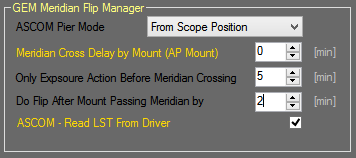
if you use TSX like mount control in Voyager choose “ASCOM Pier Mode” equal to From Scope Position. If you use ASCOm driver in mount control in Voyager select the right “ASCOM Pier Mode”. Allow passing meridian of 2/3 minute in your mount, put “Only Expusre Action before Meridian Crossing” to 5 min. Put 2 min in “Do Flip After Mount Passing Meridian by”.
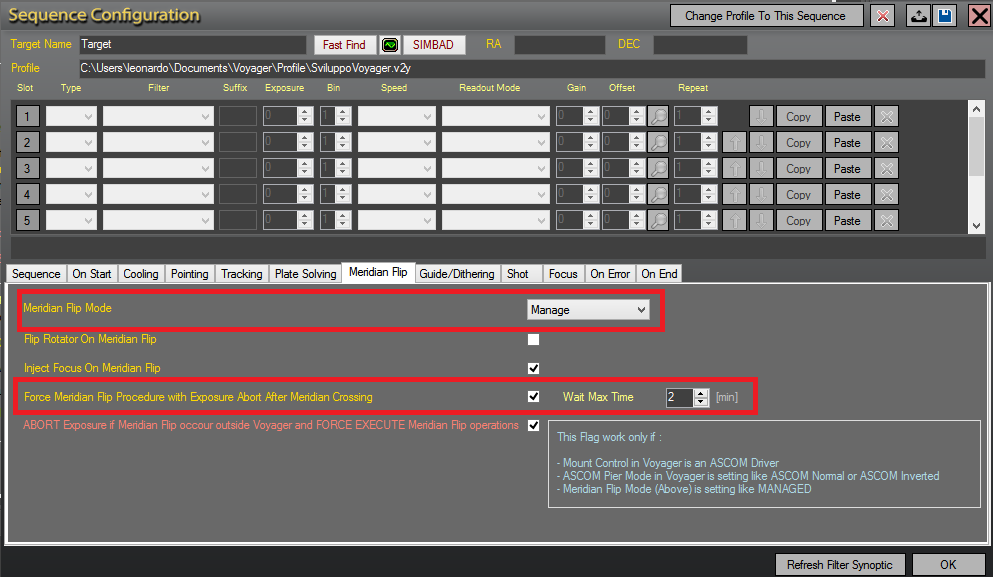
In sequence configuration, tab Meridian flip, remember to check the flag “Force Meridian Flip Procedure with Exposure Abort After Meridian Crossing” and put 2 min in the field value. This force to meridian flip mount after 2 minute crossing it whetever actions is running and aborting exposure running. Remember to create a base sequence configuration with this setting to inherits for all targets.
This could work, do some test on meridian cross using a sequence with a target near meridian (a star before meridian of 10 minute) to dont waste so many time in test sessions.
If you need more help or want to do togheter from remote just write me to support mail or use the whatsapp number.
All the best
LO