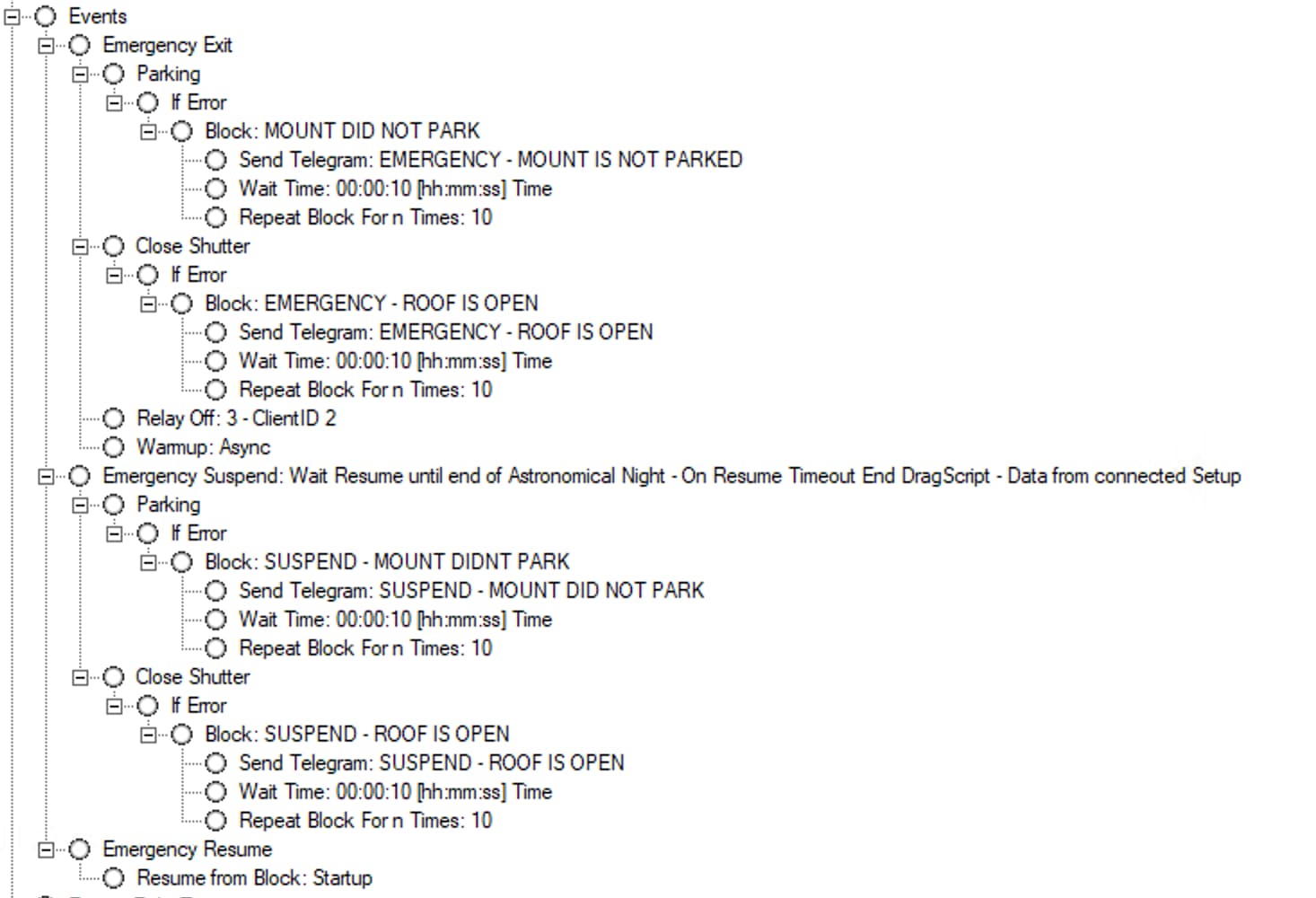
I was wondering if I could get around some notifications under EXIT when already in SUSPEND. Maybe a variable or an if/then? I’m not too savvy at scripting.
The sequence of events last night was:
SUSPEND for Cloudy
Mount parked command (Success)
roof closed (Success)
EXIT for Very Cloudy (while still in SUSPEND)
Mount park error since it was already parked
Alerts sent for mount not parked (EXIT event)
Panic attack
While this is not terribly troubling and everything worked as expected, I am old and need my sleep or to be more exact my wife needs her sleep and I don’t want to get beat up in the middle of the night.
Any thoughts on how to gracefully get an EXIT while in SUSPEND and not send out alerts? Screenshot of my event sequences below.
and in case you were wondering, it’s a Paramount MX. I know other mounts don’t throw an error for this but TheSky64 does.
You could consider modifying SUSPEND / Cloudy procedure, leaving the EXIT / Very cloudy procedure as is.
Suggested mod to SUSPEND:
park mount as current DragScript
new instruction add Unpark to DragScript
in Voyager | Mount Setup | Park / Unpark, de-select option “Start Tracking at Unpark”
Note 1: you may need to modify the Startup script to re-activate the unparked mount
Note 2: untested, low risk change but a dry run always advisable
Another couple of other options-
in SUSPEND state, set mount to e.g. HOME (instead of PARK) and set Tracking OFF, or
in EXIT state, send “Unpark” followed by “Park” commands
The last would only be an option if sending “Unpark” command to an unparked mount does not throw a SkyX or Voyager error
Suggestion 1 has a lot of promise … My startup section does unpark and home the mount, so that’s not an issue. I wont get an error by unparking a mount that is already unparked which makes it even more baffling why parking a parked mount causes an alarm.
As far as setting the mount to home, I have an interference issue with the big refractor, so I definitely need to get close to the park position or my safety sensors wont let the roof close but setting the scope to a position (the same as the park position) would definitely work.
The Paramounts can be a little weird and since this mount doesn’t have absolute encoders, unparking it, requires homing it every time. If I just re-issued the park command, it would fail and I would be back to the previous issue.
Thanks Leo and agreed on the external sensor … I have a reflector on the mount which the Dragonlair roof controller looks for. I’m gonna try to set the position during a Suspend to the same RA/DEC as the PARK command and then turn off tracking. That should allow the roof to close and for the mount to be ready for a resume or to PARK without griping.